Showing posts with label Formating. Show all posts

Wednesday, December 7, 2011

How to create your e-book by SB Jones.

The original guide I wrote in June can be found HERE.  It is still a great guide, but as I have said before, it's time to update it.  The same disclaimer as before, your mileage may vary with this guide and as time moves forward, new devices, programs, and features of e-readers may render this obsolete quickly.

The main change with this guide is the addition of how to create a Table of Contents for your e-book that allows your readers to jump to a desired chapter.  Even if you don't care about a TOC, you should have one.  Every little bit of polish makes your e-book look and feel that more professional.

This guide is for converting a Microsoft Word Document.  If you are working in another word processor, I am sure you can achieve similar results.

First, you need to get the programs that let you do all the work.
Mobi Pocket Creator, and Calibre.  You will also want to have a Nook or Kindle handy to side-load your novel, or use the Kindle for PC or Nook for PC apps to review your book.

First, make sure you are saving your your word doc as a .doc file and not a .docx file.  This is easily done by using the "Save As" feature in Word.  The reason for this is to avoid a lot of the meta data that gets added to the newer .docx files.


Now comes the grunt work.  Cleaning up that Word doc.  First you need to understand that the Kindle will auto indent your paragraphs.  So if your document has a tab indent, you will need to remove these.  You can do them manually or use the paragraph and page setup in word.


Next, we are going to look at some typesetting options.  I prefer to use single spacing with an extra half space after carriage returns.  When converted, the extra half space in my opinion gives it a nice look and makes it easy to read and looks nice and clean.  Remember, some people may read your book on their phone so you want it as readable as possible.  Having a massive wall of text is annoying.


Take your time with this step.  You may find yourself converting your book several times as you make adjustments to get it to look and feel the way you want.  You spend months or years writing the book, you can spend the hours needed converting it for upload.


Now lets create your Table of Contents.  This step is actually quite easy.  I didn't do it for my first novel because all of the information I found was convoluted and unnecessarily complicated.  Some even wanted you to manually code and write the TOC in HTML.

First, just navigate to your word doc and place the cursor at the start of a chapter.  Click the Insert tab, then the Bookmark button and give the bookmark a name.  I used Ch1, Ch2, etc for each of the chapters.


Once this is finished for each chapter, highlight where it says Chapter 1 (or whatever chapter titles you are using) and click the Insert Tab then Hyperlink.  In the popup box, click where it says "Place in This Document" and you should see all of the bookmarks you created.  Pick the correct bookmark and hit ok.  It's as simple as that.


You are going to want to test all of your links and verify that they jump to the correct chapter.  Also if you want, you can make each chapter title, jump back to the Table of Contents as well.  I don't do this because the e-readers have a "back" button already.  Less code means less opportunities for error.

Lets move onto the conversion process now.  Close out of your word document, Mobi Pocket Creator doesn't like it if you have the document you are going to convert already open.

Launch Mobi Pocket Creator and click where it says Import from Existing File: MS Word document.


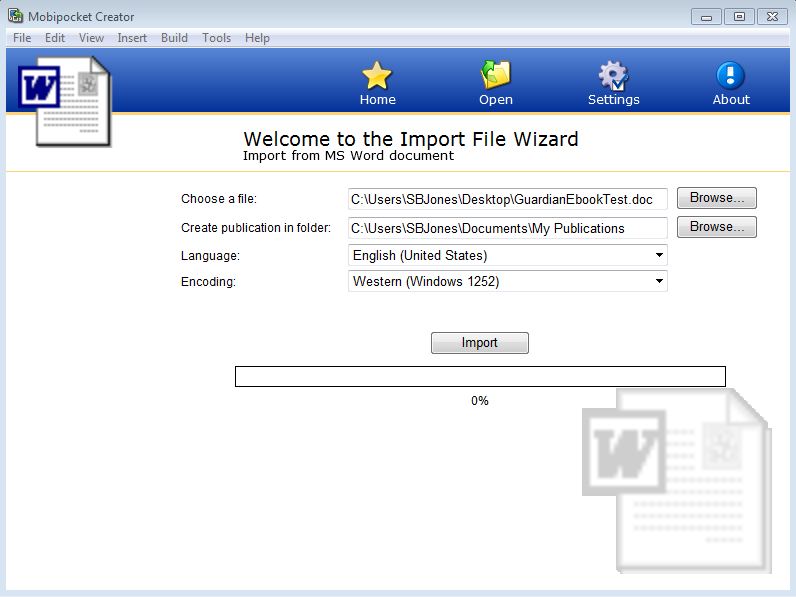
Browse to your document and click import.


You should see your file listed there now as an HTML file.  Click where it says Cover Image then the button that says Add a Cover Image.  Browse to your cover and press the Update button at the bottom.


This will take you back to the HTML file,  Now click where it says Metadata, and fill out the information.  Metadata is important so take a few minutes and fill out as much of it as you can.  If you don't know what to put, then just leave it blank.  Most of the information you have to give directly to Amazon or Barnes and Noble anyway.  When you are finished, make sure you hit the Update button to save the information. (ignore most of this if you are building test files to view your formatting and typesetting to save time)

Now, Click the build button.  If you wish to add any compression or encryption, this is where you can add it.  Once you have made your options.  Click the build button.


Once it's done building, I open the folder, and open the new PRC file with the Kindle for PC app for review.


Take your time and scroll through the book.  Verify all the links work for the TOC, the cover is embedded properly and note down any mistakes you find.  If you find anything you don't like or isn't working.  Go back to your word document and correct them and reconvert the book.

Once your book for Kindle meets your standards.  It's time to convert for Barnes and Noble.

Open up the Calibre program, and click on the Add book icon.


Navigate to where your newly created PRC file is and hit open.


Once you see your novel, select it and hit the convert icon.


You can browse through some of the menus if you want and change a lot of the meta data, add to it etc.  The inportant thing is to make sure in the top right corner under Output Format, EPub is selected.  Once you are satisfied, click the OK button and let it do its thing.  There will be a progress wheel in the bottom corner. When it stops, the conversion is complete.


Navigate to where the Epub file is and open it with the Nook for PC app, or side-load it to your nook for testing.  You may have to search for the file, but Calibre by default saves the file in its library folder.


Drop it into your Nook for PC and like before, verify that everything works, check the links again, and scan every page for errors.


If everything looks good, take it over to Amazon and Barnes and Noble and upload them and start selling books!


Tuesday, December 6, 2011

Guardian has been sent to the printers.


I just finished uploading Guardian to Lightning Source today.  I spent all of Monday tweaking the pages, headers, styles to fit the proper format.  Even adjusting the lines per page.  Today, I sat back down and went over it all again to make sure I hadn't missed anything.  I have learned a lot about typesetting after launching Requiem.

When I went through the same process with Requiem, I had missed a few things and it cost me around $100 and delayed things by an additional week.  Lesson has been learned so hopefully when I get the proof copy of Guardian next week, it will be ready for approval and distribution.

On a side note, I would like to thank everyone who went to my Facebook page and hit the like button.  I was able to secure a unique Facebook URL.  www.facebook.com/sbjonespublishing

I can use this new URL on promotional items and the like, and it makes it easier to remember and post.

I am going to keep today's blog short.  If anyone has any questions about Lightning Source or the process of uploading your title to them. Ask in the comments section.  Also I have a bunch of new screen captures of the conversion process to make your word doc kindle and nook ready.  I think I will post that guide in a few days, or next week so look forward to that.

Monday, November 14, 2011

Barnes and Noble results and Guardian cover debut

Where to begin?  Saturday's book signing at Barnes and Noble was a huge success.  I would be lying if I said I wasn't nervous.  Having been a trainer for Dell, speaking and getting up in front of groups of people doesn't scare me or make me all rubber legged.  However, that was years ago.  Public events, crowds, and talking is a skill.  A skill I haven't used in a while so it was a bit rusty.  I met a TON of great people, and handed out close to 130 signed and dated postcards.

It's very interesting the dynamics of the people who walk into a Barnes and Noble.  The biggest surprise, but once you think about it, it kinda makes sense, was that very few people that I talked to owned an eReader.  The down side to this, is secondary online sales I expect are going to be low.  The last book signing had a nice spike in Kindle and Nook sales in the weeks following the event.  Regardless the exposure was priceless.  The staff of the store was great and impressed with the results.

So how well did the signing go?  Well...  Here is a picture of me acting all cool.  Some of the reactions people give are entertaining.  It's almost like there is some preconceived image of what an author looks like and I apparently don't fit the bill.  Even when I asked people if they would like to take a look at my book, they would still ask if I wrote it.


Book two: Guardian is just about finished.  There have been three complete edits and the book cover is finished as well.  I am ahead of schedule, and the manuscript is going to be sent to a few lucky beta readers.  So without further delay.  I present to you the full cover of The Eternal Gateway Book Two: Guardian.


I'm very pleased with it.  It was commissioned by JR Fleming.  And the book signing.  I sold out of every copy they had.  Achievement unlocked.

Wednesday, November 9, 2011

Countdown to Guardian and Barnes and Noble

This entry is a day later than normal, but I had the momentum going and I did not want to interrupt it.  Today, Guardian has been through three rounds of editing.  My editor and I finished up reading the last chapter out-loud only a few hours ago.  The only thing left for Guardian is to polish up the blurb and synopsis that goes on the back cover and hand out a beta copy or two for fresh eyes to experience the story without editor glasses on.  I had to spoil a bunch of book 3 for my editor as well.  At first she was content when I explained that the parts she wanted me to change or didn't make sense would be 'explained in the third book'.  But yesterday I had to let her in on everything.  As expected, everything made sense then.  The idea is that you can read through the trilogy and it will be a very good story.  But after the third book I want my readers to go back and re-read them and be totally shocked that they didn't see it earlier.  One of the original goals of the trilogy is 'replay value'.  Linear plots don't lend themselves well to this.


The most popular post on my blog by far is the entry in June about my eBook conversion guide.  I plan on rewriting it in the coming weeks when I convert Guardian to the Kindle and Nook formats.


This Saturday the 12th, I have a book signing at Barnes and Noble in Twin Falls Idaho for my first novel Requiem.  It starts at noon and I will be there until closing.  This is pretty cool because most self published authors never see their book on the shelf in a chain store, and even fewer have a book signing in one.  I didn't get any pictures of the last book signing so I will put fourth effort to get some this time.


Here is a closing picture.  It's not the greatest with the suns glare, but that is what I woke up to on Tuesday morning around 7:30am after the time change.  The water is warmer than the air so the river and waterfalls give off steam.  I wonder what story ideas this might inspire someone?

Tuesday, September 27, 2011

Taxes, Interviews, and Positive Thinking.

First I would like to let everyone know that Action Adventure Inc Blog has a short interview posted about myself and my first book Requiem.  It is interesting to read it myself even though I answered the questions only 21 days ago.  When you are learning and growing as an indie author, your perspective changes almost daily with each new experience or lesson learned.  At the one year mark, I will have to go back and re-read my blog and comment about what I see and how I changed as an author and person.  I found this picture to be funny after searching Google for "interview".  The desk lamp looks like it has been stabbed into the guys neck and the girl reminds me of MTV's Daria trying to figure out what is going on with her classic strait face.


Taxes taxes taxes.  Well, the bright side to taxes is that if you have to pay them, then you made money.  So I should look forward to the time every quarter when I have to sit down and do taxes.  The taxes today is for sales tax.  When I set up SBJones Publishing, I needed a sales and use tax permit number and one of those tax exemption numbers you need to buy things without tax.  This was something that was required when I set up my Lightning Source account for the paperback book.  This lets me order my own book and not pay taxes on them, but I have to collect it from my customers.  I purposely priced my book to $14.15 so it comes to an even $15 when I sell it online through my blog, or in person at a book signing or other encounter.  I don't have to worry about sales tax on books sold through B&N or Amazon because they are responsible for sales tax and all I get is a commission subject to income tax.  I know some of you are wondering how much taxes I have to pay.  Are you ready?  I have to send in a total of $31.45 of collected sales tax this quarter.  Between my two book signings, blog sales, and other paperback sales, I personally sold 37 paperback copies of Requiem.  If you want, you can always hit that "Buy it Now" button on the right and add to my tax burden if you want.


So the other day I was drinking beer with my editor and she was complaining about the fee's involved with having a VISA machine.  I had to agree, they were depressing and that is why I am a big fan of Square.  Then there were the complaints about banking fees.  Again I had to agree.  Once the rant was finished I said.  I can only hope one day that the fee's and limitations become an issue.  In fact, they should be goals you try to attain. For example, if you exceed $5,000 sales in a single day.  Square will only deposit a maximum of $5,000.  You will have to wait a day to get the rest.

Oh darn.  The day I sell 334 or more books in one book signing or event to break the $5,000 mark and I have to wait an extra day to see the rest of my cash is one I can't wait to happen.  And if it becomes to big of a hassle, you can call Square and explain and they will raise this limit.  The day I have to call Square because cash is so backed up that $5,000 a day just isn't enough to get caught up is another happy day.

My bank has a similar setup.  Cash deposits of $5,000 or more are subject to a fee.  Guess I will just deposit $4,999 and come back the next day to deposit the rest.  What a rough life it would be to have to visit the bank every day to make a $5,000 cash deposit.

So with that good news, I have to do some self promoting here.  That spike in sales I talked about last time after I had my book signing.  Requiem came so so close to breaking into the top 10,000 of the Amazon ranking. 10,630 is where it topped out at.  My bingo card has a square on it that says its under 9,000 on it.  (a joke for the it's over 9,000 meme).  That square is going to get crossed off!

Congratulations to the latest winners of the Requiem eBook a Day Giveaway.  It's almost over with only three more to give out so time is running out if you haven't signed up.


Sept 23 Mav
Sept 24 Kathy Jones
Sept 25 Andy Maestas
Sept 26 Kim Miller
Sept 27 Purna Thanandabouth

Friday, September 23, 2011

Musings

First I would like to point to ML Stewart's blog.  I have been following and commenting on his blog almost since he started it about his The Facebook Killer series.  I find his blog to be highly entertaining and the best way to describe it is with a 'You're doing it wrong" picture, but it's working for him if you check out his rankings.


Next, I want to chat a bit about success.  There has been a lot of articles, blogs, and forum posts regarding that the Kindle gold rush is past us.  If you don't sell a million eBooks you're not successful.  You can't make a living as an indie author, so don't quit your day job.  A lot of negativity, and the impression I get is that lately there have been a large influx of people rushing for the Kindle gold who don't even have a book finished yet, or only have one book and can't figure out why their book doesn't sell.  The obvious answer is they are wanting Amanda Hocking and Joe Konrath success with one book where these authors have tons of books available and they have tons of fans buying them.  This is fool's gold.


Konrath's latest blog post says it best.  If you have two $2.99 novels and three 99c short stories for sale, all you need is 10,000 fans and you are making $50,000 a year if you continue to produce a novel every 6 months and a short story every four months.  This is much more realistic and attainable than superstar success.  For me, half of this would be what I need to pay all my bills and live comfortably.

Lets break this down.  For myself my novels are going to average roughly 80,000 words and a short story would run about 10,000 words.  This means I need 190,000 words a year for two novels and three short stories.  Let's just round that up to 200,000 words.  That puts me at a minimum of 3850 words written a week or a whopping 770 words a day for 5 days a week.  Slow typing at 30 words per minute this should take you a half hour to complete.

A more realistic number is 1000 words a day five days a week.  This gives you 260,000 words a year, but also lets you miss a lot of writing for book covers, editing, promoting, etc.  However, in two weeks you can have a 10,000 word short story complete.  Another week for editing and that fourth week to format, put a cover and in a month's time you have a 99c short story ready to sell on Amazon.

If you don't have an hour a day to devote to your writing, then you need to make the time.  Once the kids are in bed, instead of watching some reality TV show on your DVR, sit and type for an hour.


Getting fans of your work is the hard part, and easy part.  Like the doing it wrong picture, I think most people go about this the wrong way.  Authors tend to be introverts to begin with and you need to get past this.  If it takes a shot of tequila to open up then do it, but no one will get you fans faster than yourself.  Most of us already have a lot of fans but we don't even know it.  Start small. 10 fans, 50 fans, 100 fans, 1,000 fans.  Don't be afraid to ask your family and friends to help.  The trick here is these people need to be real fans, not some mass add me to your twitter account crap.  Also you need to get over your fear of asking for the sale.  You can blog, tweet, and Facebook your book all day long and never get a sale, but if you shake someones hand and become a real person, you will sell books, and you will make fans.  Best part is these fans generate referrals.  Online fans can work, but it's a lot harder to shake their hand or have a couple of minutes conversation.  Replying to comments, emails and forums helps, but they need to be fans, not other authors, editors, publishers.

Asking for the sale is hard.  It took me about an hour to warm up at my last book signing and about two hours after that it dawned on me what I was doing wrong.  Don't start a sale with your genera or book, start with yourself the author.  When people were walking by, I was asking them if they liked Science Fiction or Fantasy novels.  Overwhelmingly the answer was no, or that they don't read.  If they said yes, I engaged them and either sold a book or gave them a signed postcard.  What made me realize this wasn't working was the number of people who did stop to talk, did not grasp that I was the author of the book.  I figured the sign that said "Local Author Signing" in front of my booth was enough, but it wasn't.  When I started asking people if they would be interest in taking a look at the book I wrote and published.  Almost everyone now stopped and engaged.  The people who didn't read, still did not buy the book, but about a third of them took a signed postcard because their kid liked this stuff, or had a friend or relative who did read.  Those who did read but dislike Science Fiction were better at around half of them knew someone who would be interested.  I sold a few copies to non Science Fiction readers because I the Author was sold, not my book.  These people also had friends and family who read and took postcards.  I attribute all of my 15 secondary sales this week from this engagement that would have been completely missed if I hadn't changed my approach.  In one afternoon, I sold 22 books, handed out over 50 postcards, and talked to about a 100 people in a real conversation.  When you're starting out, this is the type of thing you need to do.  Become a real person, sell yourself, get over your fears, and write consistently and constantly. When it comes time to measure your success, be sure to have a realistic idea of what success is.  I sold 22 books, I made about $115, I am a successful author.


Tuesday, June 7, 2011

eBook Conversion Guide basic.

I have updated this guide as of Dec 7, 2011.  The updated guide can be found here.
http://theeternalgateway.blogspot.com/2011/12/how-to-create-your-e-book-by-sb-jones.html

This is a basic guide to convert your manuscript into .prc for the Kindle and .epub for the Nook.  I am not going to go over anything super fancy like embedding links or creating a table of contents.  Your mileage with this guide may vary with the versions of the programs you are using as well as this document ages, links may change and program versions get updated.  READ THE WHOLE GUIDE.  There are some formating issues you need to be aware of that I go over in detail at the end.

I used Microsoft Office Word 2007 to write my manuscript.  I also saved it as a .doc file.  This is an older compatibility mode and not the default .docx
Next is Mobipocket Creator version 4.2 build 41.  I downloaded this from the link provided by Amazon here.
And the last conversion app I used is called Calibre that can be found here.

Next I downloaded the pc reader versions of the Kindle and Nook to test my conversion and formating.  These apps can be found here.  KindlePreviewer  NookPCApp.


Now, of all the guide and information I found.  Amazon's own guide to create an eBook was the best by far.  All the other guides I found were teasers.  Just tiny bits of useful information that served no purpose other than trying to get you to buy a book or service to have it done.

Amazons guide says to convert to html and then run it through the Mobipocket app.  This is an unnecessary step now as the app will work right from a .doc file.  Simply click the option for ms word document.

Browse to your saved .doc file and press import.  If it hangs at 25% look behind the window and make sure you don't have a dialog box requesting permission to continue.  This can happen if you already have your manuscript open in Word.  It doesn't like that the file is already open in another program.


Now you should have a menu in Mobi that shows your manuscript listed as an .html file.  The next step is to add your cover.  Click the link that says Cover Image and press the 'Add a cover image' button.  Browse to where your cover art is and click open then click the update button.  I don't have my cover finished yet, so I am using a simple image that I created in MSPaint for this guide.


Next is Metadata.  This is important because the metadata is where a lot of information is stored about your eBook that can be used for searches, sorting, and all kinds of other information.  Think of this as where the title, singer, album etc that you see from MP3 files.  Also car radios that display the song and title for you get this info from the metadata.  If you do not know what to put in one of the fields, then leave it blank.  You should also see your book cover near the bottom as well.  Like before, when you have it filled out to your satisfaction, click the update button on the bottom.


Now click the build icon at the top of the window in Mobipocket Creator.


Here you get to set you compression levels and encryption options.  If you encrypt with DRM, the viewer wont display your eBook so for now use no encryption.  You can always go back and add it later.  Once you are satisfied, click build.  Open your Kindle Previewer app and drop in the prc file to view.  I recommend you go over every page to make sure it is the way you want it.  If you find any errors, correct them in your .doc file and repeat the process.  The only bit that takes any time to do is the 2 minutes to fill out the metadata.


Now, let me go over some of the problems I ran into.  Hopefully you read this part before you started.  On Amazons web page there is a line of text that doesn't stand out much, but it is extremely important.


Also your manuscript will automatically be left and right justified, so you don't need to do this in word.  So if your Word doc has tab indentation for each paragraph. You need to get rid of them or the Kindle will double tab and your paragraphs will start in the middle of the page.  Here is a clip from the word document and how the Kindle app uses its own formating.


What you need to do is remove the tabs manually, or change the paragraph layout to remove them in word.  Also you will need to get rid of any page numbers, headers and footers.  These will not line up at all when you convert to an eBook.  Also remember people can change the font size in the reader as well so page numbers in your manuscript will never line up with pages in an eReader.  So you should have something now that looks like this as a final product.


Take your time to make sure the Kindle version of your eBook is the way you want it.  Because this .prc file is what we are going to use to make your Nook version.  Also you need to do this process twice, because the ISBN number for the Nook version will be different than the Kindle version.  Make sure you go back and edit your copyright page and metadata to reflect this.

Now it is time to create the ePub file for Barnes and Noble's Nook.  I found that if you try to follow any guides about creating a PDF and then meat grinding it into an ePub file its going to suck.  I spent a good 5 hours trying to get it to work correctly and never got a final product that I would show the world.  PubIt's site sucked for information compared to Amazons and I spent more time trying to get a good epub book than everything else combined.  I almost gave up in frustration until I figured it out.  It was so simple, like 6 clicks and 30 seconds it was done.

So first open up Calibre


Then click the Add book button at the top.


Browse to your .prc file you just created for the Kindle with your updated isbn and copyright page and it should be added to the list of books.


You can click that blue "i" button next to the add book to review your metadata and edit it here but not the copyright page.  There are a few extra options you can fill out if you want.  Like if your book is part of a series.  When you are ready, make sure your book is selected and hit the convert button.

At the top left you should see input type as PRC and on the top right the output should be EPUB.  If it is not, then use the drop down to change it to EPUB and hit the ok button


Let it grind away.  You will see a buffering wheel next to jobs while it grinds out your epub book.  You can click on jobs and see the details if you like.  Once this process is complete, you will need to find your epub book.  When you added the .prc file, Calibre put it in its library folder under the author name.  Navigate to it, or do a search for *.epub and you should find it listed by the book title.  Drop the epub file into the Nook Reader.


Verify each that each page looks good and then congratulate yourself for creating your first Kindle and Nook eBook.  Hopefully if this is the first time you have created these file types, this guide helped and it did not take you more than an hour or two and feel proud for not spending a thousand dollars and waiting three months for someone else to do it.  If you have special formating in your book, like pictures, tables, bullet points and the like, hopefully they made it through the process ok.  If they did not, you may need to play with it, or hit up some of the Kindle forums.  There is a lot of helpful people there.